FORMATTING GUIDE
Master the Rules of Screenplay Formatting
Your Complete Guide to Industry-Standard Formatting Best Practices
Screenplay Format Guide
Why Formatting Matters
Formatting is the unsung hero of screenwriting. It ensures that your script reads professionally, letting your story, characters, and dialogues shine. While storytelling takes center stage, poor formatting can quickly overshadow even the most brilliant narrative. A well-formatted screenplay makes it easier for readers—whether producers, directors, or actors—to envision your story.
AtScreenplayInk, we make your life easier by ensuring your script adheres to global and Indian film industry standards. All you need to do is focus on your creative process—our software handles the rest.
WhatScreenplayInk Does
- Industry-standard formatting for Bollywood, regional cinema, and international markets.
- Automatic scene heading formatting, character cues, and dialogue alignment.
- Support for multiple Indian languages (Hindi, Telugu, Tamil, Malayalam, Kannada, and more) with native script and transliteration options.
- Page settings optimized for A4 paper size—the Indian standard.
Note: WhileScreenplayInk helps you format effortlessly, we do not provide manual formatting services. This guide will ensure you understand and appreciate professional screenplay formatting conventions.
General Formatting Guidelines
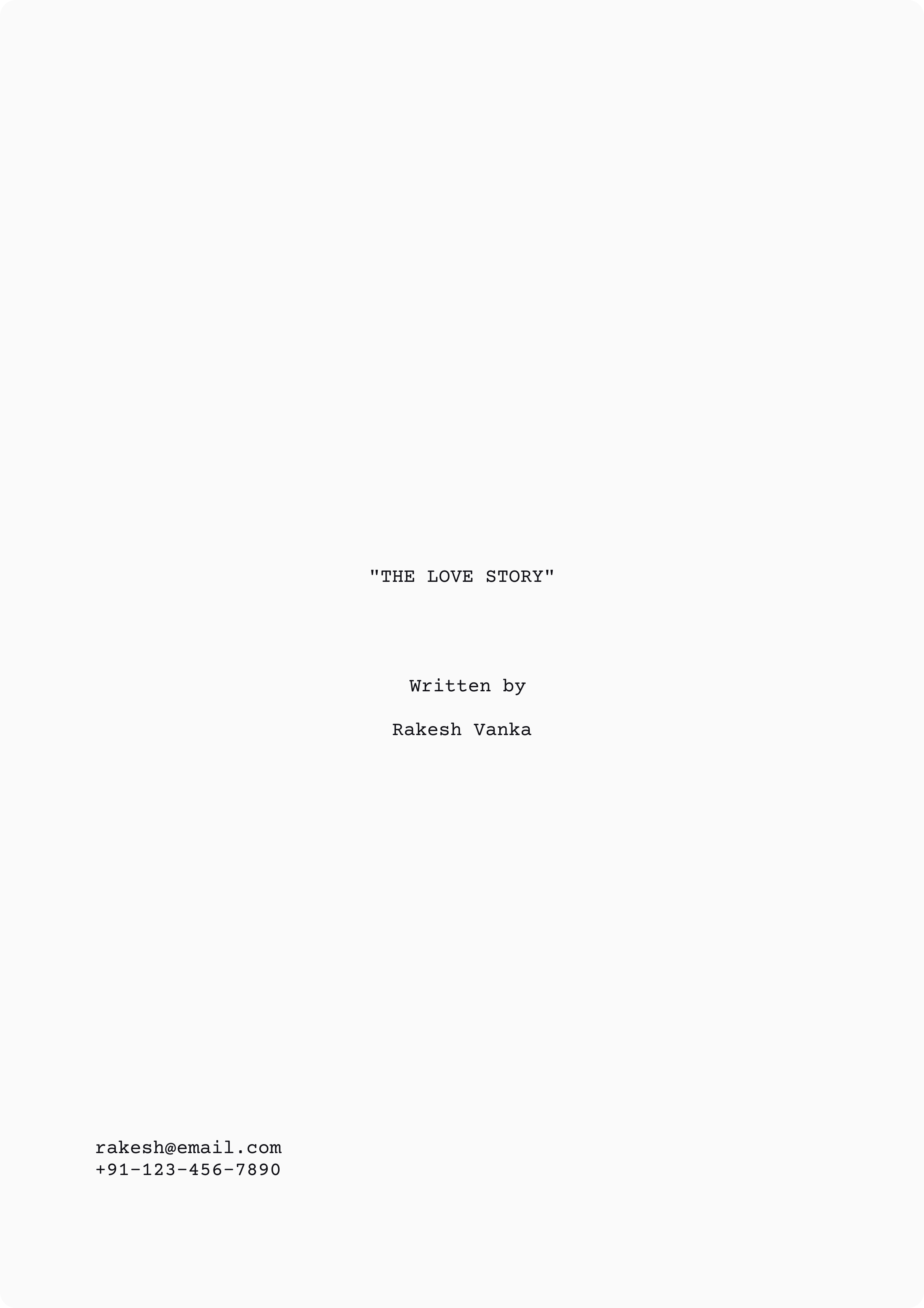
Title Page
Your title page sets the tone for professionalism. Inc
- Script Title: Centered, ALL CAPS, bold.
- “Written by” or “Screenplay by” followed by the writer’s name.
- Contact Information: Place at the bottom left of the page (email, phone number, etc.).
Example for Title Page:-
- Avoid images, graphics, or fancy fonts. A plain, clean design conveys professionalism.
Typeface and Page Settings
Your title page sets the tone for professionalism.
- Include: Font: Courier 12-point (fixed-pitch). This ensures every character takes up the same space.
- Paper Size: Use A4 (8.27 x 11.69 inches)—the standard for Indian scripts.
- Margins: Top: 1 inch , Bottom: 1 inch, Left: 1.5 inches, Right: 1 inch.
- Page Numbers: Start on the first script page (not the title page), top-right, aligned with the margin. Example: "Page 2"
Screenplay.ink ensures precise formatting and pagination automatically, including margins, headers, and footers.
The Script Elements
FADE IN
Always begin your script with FADE IN: on the left margin, followed by a blank line.
Scene Headings (Sluglines)
Scene headings tell the reader:
- Location: INT (Interior) or EXT (Exterior)
- Specific Place: e.g., "MUMBAI CAFE"
- Time of Day: e.g., DAY or NIGHT
Format:ALL CAPS and left-aligned.
Example for Scene Headings:-
INT. MUMBAI CAFE - NIGHT
Action Lines
Describe what’s happening in the scene. Keep it concise and visual. Action lines show, not tell. Avoid over-directing or using camera instructions unless absolutely necessary.
Example for Action Lines:-
A bare bulb swings, casting eerie shadows across the cafe. RAJ sits alone, sipping tea. The distant rumble of a train echoes.
Character Cues
Character names appear in ALL CAPS, centered, above the dialogue.
Example for Character Cues:-
RAJ
Dialogue
- Write dialogue beneath the character’s name, indented about 2.5 inches from the left ma
- Avoid justification; it should be left-aligned.
Example for Dialogue:-
RAJ
I'm just saying... sometimes tea
tastes better when you're alone.
Parentheticals
Parentheticals give short, specific directions for how dialogue is delivered. Use them sparingly, and only when necessary for clarity.
Example for Parentheticals:-
RAJ
(whispering)
Don't look now.
Transitions
Transitions (like CUT TO:, FADE OUT:) appear right-aligned and in ALL CAPS. Use them sparingly—mostly at the beginning and end of your script.
Example for Transitions:-
FADE OUT.
End of Script
Conclude with:
Example for End of Script:-
- Centered, ALL CAPS, and underlined.
THE END
Formatting Tips for Indian Scripts
Regional Dialogues
For Indian scripts,ScreenplayInk allows you to write dialogue in native languages like Hindi or Telugu while retaining English transliterations for broader understanding.
Example for Regional Dialogues:-
RAJ
(In Hindi, subtitled)
Chai aur tanhai ka maza hi
kuch aur hai
Song Lyrics
Songs are a common feature in Indian films. Use structured formatting for clarity
Example for Song Lyrics:-
SONG SEQUENCE :
(Lyrics)
MAHI VE, MAHI VE,
DIL CHURAA LE RE...
Spec Scripts vs Shooting Scripts
Spec Script
This is the version submitted to studios. Avoid camera angles, CONTINUEDs, or scene numbers. Focus on storytelling.
Shooting Script
Used in production and includes scene numbers, camera directions, and technical instructions.
ScreenplayInk helps you transition from a spec script to a shooting script effortlessly with automated tools.
Best Practices
- Keep it Under 120 Pages: A screenplay should ideally be 90–120 pages. One page roughly equals one minute of screen time.Proofread before submis
- Avoid Clutter: No images, bold text, or underlining (except for THE END).
- Spell-Check: Typos create a poor impression.
- Page Consistency: Do not cheat margins or reduce font size to compress pages.
WhyScreenplayInk?
WithScreenplayInk, formatting becomes effortless. Features include:
- Automatic A4 pagination and industry-standard margins.
- Scene heading and dialogue alignment tools.
- Support for Indian languages and transliteration.
- Templates for Bollywood, regional cinema, and international submissions.
Final Note
The best screenplays adhere to proper formatting because readers respect writers who respect the craft.ScreenplayInk takes care of formatting so you can focus on storytelling.
Start Writing Your Masterpiece Now!
Script Format: Tense
The tense you use in a screenplay is critical because it directly affects how the reader visualizes the action. In screenwriting, the present tense is the industry standard. This choice is not arbitrary; it serves a specific purpose—keeping the reader immersed in the immediacy of the story as if it’s unfolding in real time.
Screenplays are blueprints for visual media, and the present tense aligns with the immediacy of film and television, where everything is happening in the moment. Deviating from this convention can confuse the reader, disrupt the flow, and make your script feel unprofessional.
Why Use the Present Tense?
Immediacy and Visual Impact
The present tense creates a sense of urgency and immediacy, mirroring what the audience will experience when they watch the film.
Example for Immediacy and Visual Impact:-
A car speeds through a narrow alley.
The driver grips the wheel tightly, his knuckles white.
Clarity
The present tense keeps descriptions clean and direct, eliminating unnecessary words and clutter.
Example for Clarity:-
Rajan dives into the river.
The water splashes around him as he disappears beneath the surface.
Alignment with Film Grammar
films are visual media, and the present tense reflects what the audience sees and hears. It helps the director, actors, and crew visualize the action as immediate and ongoing.
What to Avoid
Present Progressive Tense
The present progressive tense (using “is” + verb + “-ing”) slows down the narrative and makes the action feel indirect or incomplete. It suggests the action is ongoing but not fully realized, which clashes with the dynamic nature of screenplays.
Example for Present Progressive Tense:-
Meera is running through the crowded market. She is dodging fruit carts and bicycles as she is looking for an escape route.
Corrected to Present Tense
Example for Corrected to Present Tense:-
Meera runs through the crowded market. She dodges fruit carts and bicycles, scanning for an escape route.
Past Tense
The past tense distances the reader from the action, making it feel like a story being told rather than an experience happening in the moment. This breaks the immersive quality of the screenplay.
Example for Past Tense:-
Rajan walks into the room and picks up the revolver. He turned toward the window, staring at the city lights.
Corrected to Present Tense
Example for Corrected to Present Tense:-
Rajan will enters the room and picks up the revolver. He will turns toward the window.
Future Tense
The future tense (“will” + verb) suggests events that might happen rather than those unfolding on the screen. It undermines the immediacy required in a screenplay.
Example of Future Tense (Avoid):-
Rajan enters the room and picks up the revolver. He turns toward the window.
Corrected to Present Tense
Example for Corrected to Present Tense:-
A vase topples off the table and shatters on the floor. .
Tips for Writing in Present Tense
Use Active Verbs
Active verbs make descriptions vivid and dynamic.
Example for Use Active Verbs:-
The crowd is cheering loudly.
Avoid Overuse of “Is” and “Are”
Relying too much on “is” or “are” can make sentences feel passive or repetitive.
Example for Avoid Overuse of “Is” and “Are” :-
The crowd is cheering loudly.
Be Concise
The present tense works best when descriptions are concise and to the point.
Example for Be Concise :-
Instead of:
Rajan is walking slowly across the room, looking around as if he is expecting something to happen.
Write:
Rajan walks slowly across the room, his eyes scanning for signs of trouble.
Visualize Each Action
Picture the scene as it would appear on screen and write it as it unfolds.
Example for Visualize Each Action :-
Meera pushes open the heavy wooden door. It creaks, revealing a dimly lit hallway.
Break Long Actions into Steps
Example for Break Long Actions into Steps:-
Instead of:
Meera opens the cupboard, grabs the knife, and cuts the rope in one swift motion.
Write:
Meera opens the cupboard. She grabs a knife and slices through the rope.
Benefits of Consistent Use of Present Tense
Professionalism
Using the present tense consistently shows your understanding of screenplay conventions.
Readability
Scripts written in the present tense are easier to read and imagine, keeping readers engaged.
Production-Friendly
Directors, actors, and crew rely on the script as a blueprint. The present tense ensures clarity for immediate visualization and action planning.
HowScreenplayInk Assists with Tense Usage
ScreenplayInk automates tense consistency, helping you maintain professional standards without worrying about errors. Here’s how:
Tense Checker
The built-in AI scans your script for tense errors and suggests corrections.
Real-Time Feedback
The editor highlights instances of present progressive, past, or future tense and provides examples of proper present-tense usage.
AI-Generated Suggestions
Rewrite clunky sentences with one click, ensuring concise and vivid descriptions in present tense.
Prewriting Guidance
Before you begin writing, the software provides tips and examples for maintaining tense consistency.
Examples of Proper Present Tense Usage
Action Scene:-
Rajan bursts into the room. His eyes dart to the corner where Meera crouches, clutching a knife.
Dramatic Moment:-
A single tear rolls down Meers's cheek. She clenches the letter in her hands, crumpling it.
Chase Sequence:-
Rajan leaps over the barricade and crashes into a fruit cart. Oranges roll onto the street as he scrambles to his feet.
Final Note
Writing in the present tense is not just a convention—it’s a tool that makes your screenplay immediate, vivid, and professional. By mastering this skill, you ensure your story feels alive on the page, just as it will on the screen.
WithScreenplayInk, tense consistency is effortless, letting you focus on storytelling while we ensure your script is polished and industry-ready.
Script Format: Margin Settings
Screenplay formatting is about precision. Margins play a vital role in ensuring your screenplay has a clean, professional layout that meets industry standards. Proper margins allow readers—producers, directors, actors—to follow the script effortlessly and ensure the correct page-to-minute ratio (one page roughly equals one minute of screen time).
WithScreenplayInk, these margin settings are automated, so you don’t need to worry about fine-tuning these values. However, understanding the layout ensures you appreciate how each element fits into the page.
Why Margins Matter
Margins are more than just white spaces. They separate different elements (action, character names, dialogue) clearly so readers can scan a page quickly. Correct margin settings also ensure that:
- Timing: Every page translates to approximately one minute of screen time.
- Readability: Elements like dialogue and action are well-defined and easy to follow.
- Professionalism: Proper formatting ensures your screenplay looks polished.
Breakdown of Margin Settings
Action Lines
Action lines describe what the audience sees and hears. These are aligned to the left margin, 1.5 inches from the edge, extending to 1 inch from the right margin. This leaves about 6 inches of width for action text.
Example for Action Lines:-
A long train pulls into a dusty station. Passengers pour out, scrambling for cool air.
RAJ steps down, suitcase in hand, scanning the crowd.
Character Cues
Character names appear centered above dialogue in ALL CAPS. The left margin for character cues is 4.2 inches, with a width of 3.3 inches.
Example for Character Cues:-
RAJ
Dialogue
Dialogue appears directly beneath the character cue, indented with a left margin of 2.9 inches and a right margin of 2.3 inches, leaving a width of 3.3 inches. This ensures dialogue remains visually distinct and easy to read.
Example for Dialogue:-
RAJ
This is where it all began.
Nothing's been the same since.
Parentheticals
Parentheticals (directions like tone or delivery cues) appear between the character cue and dialogue. Indented with a left margin of 3.6 inches and a right margin of 2.9 inches, the width is 2 inches.
Example for Parentheticals:-
RAJ
(whispering)
Stay quiet. They might hear us.
Transitions
Transitions like CUT TO: or FADE OUT: are right-aligned and appear at the far right margin. The left margin starts at 6 inches, leaving a width of 1.5 inches. Transitions are written in ALL CAPS.
Example of Transitions:-
CUT TO.
Standard Screenplay Margins
The table below summarizes the industry-standard margin settings for screenplay elements. Measurements are in inches (for clarity on an A4 page in the Indian market).
What Each Margin Means
- Left Margin:Distance from the left edge of the page.
- Left Margin:Right Margin: Distance from the right edge of the page.
- Left Margin:Width: Total space an element occupies horizontally.
Visual Margin Layout
Here is how the margins work together on a single script page:
1.5 inches (Left Margin)
6 inches width
1 inches (Right Margin)
INT. MUMBAI CAFE - NIGHT
A small, cozy tea shop glimmers under the orange streetlights. The clink of glasses echoes as tea is poured.
RAJ
(smiling softly)
I never thought I'd come back here.
FADE OUT.
ScreenplayInk: Automated Margins
ScreenplayInk automatically applies these margin settings while you write. Features include:
- Industry-standard margins for Indian and international scripts.
- Automatic alignment of character cues, dialogues, transitions, and parentheticals.
- A4 compatibility to match Indian printing standards.
WithScreenplayInk, you never have to worry about tweaking margins manually—our platform ensures your script looks polished and professional right out of the box.
Final Note
- Don’t cheat margins to fit more words on a page; it compromises readability.
- Margins aren’t a restriction; they create a flow that makes reading effortless.
- Consistent formatting shows respect for the reader and the craft.
Proper margins are the foundation of a clean, professional screenplay. AtScreenplayInk, we ensure you follow these standards effortlessly.
Script Format: Scene Headings
A scene heading (also known as a slugline) is a fundamental component of screenplay formatting. It tells the reader where and when the scene is happening. It provides clarity for production teams, directors, and cinematographers to envision and plan the setting.
AtScreenplayInk, scene headings are automatically formatted as per industry standards for Bollywood, regional Indian cinema, and international submissions. Still, understanding their structure ensures you master the art of professional screenwriting.
What is a Scene Heading?
A scene heading always includes at least two key elements:
- An indicator of the location: INT. (Interior) or EXT. (Exterior).
- The setting/location: A specific place where the scene takes place.
It can also include a third optional element:
- The time of day: Such as DAY, NIGHT, or modifiers like LATER, DAWN, DUSK.
Example for Scene Heading:-
INT. MUMBAI CAFE - NIGHT
Structure of a Scene Heading
INT. or EXT.
- Use INT. for Interior scenes (e.g., inside a house, car, room).
- Use EXT. for Exterior scenes (e.g., streets, gardens, markets).
- For continuous movement between interior and exterior, use INT./EXT.
Example for INT. or EXT.:-
INT. /EXT. MOVING TRAIN - DAY
Note: INT. and EXT. are abbreviations and must always be written in ALL CAPS and end with a period.
The Location
The location describes where the scene takes place. Keep it concise but specific. If the location includes sub-settings (e.g., a room inside a house), separate them with a slash or hyphen.
Example for The Location:-
EXT. OLD DELHI MARKET - DAY
INT. RAJAN’S APARTMENT/KITCHEN - NIGHT
INT. SCHOOL CLASSROOM - MORNING
Pro Tip: Always include the master setting first. Avoid vague or incomplete locations like “MORTY’S BEDROOM.” Instead, write “MORTY’S HOUSE/BEDROOM.”
The Time of Day
The time of day helps orient readers and production teams. Common modifiers include:
- DAY
- NIGHT
- LATER:Used when the same setting occurs later in time.
- DAWN or DUSK: Indicates early morning or twilight.
Example for The Time of Day :-
INT. TRAIN STATION PLATFORM - DAWN
EXT. MUMBAI CAFE - DAY (LATER)
Pro Tip: Avoid using redundant terms like “CONTINUOUS” unless necessary in multi-camera television production.
Scene Headings for Specific Settings
Vehicles
If a scene takes place in a moving vehicle, use TRAVELING or MOVING to describe its motion.
Example for Vehicles.:-
INT. RENTAL CAR - DAY - TRAVELING
EXT. BOAT - NIGHT - MOVING
Cities and Countries
When specifying a city, country, or notable locale, include it in parentheses to avoid confusion.
Example for Cities and Countries:-
EXT. MARKET STREET (ROME) - DAY
INT. TIMES SQUARE (1929) - NIGHT
Unique Locations with Names
If the location has a proper name (e.g., a restaurant, building, or ship), enclose the name in quotes.
Example for Unique Locations with Names:-
INT. "THE ROYAL COURT" HOTEL LOBBY - DAY
Stock Footage
When using stock footage, indicate it with a dash followed by the word “STOCK” in parentheses.
Example for Stock Footage :-
EXT. HIMALAYAN MOUNTAINS - DAY (STOCK)
Master Settings and Sub-Settings
A master setting refers to the main location, while sub-settings describe specific parts of it. Use a slash to connect them for clarity.
INT. APARTMENT/LIVING ROOM - DAY
If the camera moves from one room to another within the same setting, the new heading does not need to repeat the master setting:
INT. KITCHEN
Scene Transitions
When the action moves between interior and exterior (or vice versa) within the same shot, use INT./EXT.
INT./EXT. EDWARDIAN HOTEL - DAY - TRACKING
The term “TRACKING” indicates a moving camera shot.
Formatting Scene Headings withScreenplayInk
- Scene headings are written in ALL CAPS.
- Avoid bold, italics, or underlining for scene headings. Stick to standard formatting.
- Add two blank lines (triple-space) before each scene heading to separate it visually.
Example for Formatting Scene Headings withScreenplayInk:-
INT. MUMBAI STREET - NIGHT.
Banners sway in the warm breeze. Shopkeepers shut their stalls as streetlights flicker to life.
Common Scene Heading Mistakes to Avoid
- Vague Locations:- Be specific. Don’t write “HOUSE” when you mean “RAJAN’S HOUSE/KITCHEN.”
- Incorrect Time Modifiers:- Use DAY, NIGHT, or accepted terms like LATER, DAWN, and DUSK. Avoid “CONTINUOUS” unless writing for multi-camera productions.
- Unnecessary Scene Numbers:- Numbering scenes is only for shooting scripts. Avoid numbering in spec scripts.
Proper margins are the foundation of a clean, professional screenplay. AtScreenplayInk, we ensure you follow these standards effortlessly.
Why Scene Headings Matter
Scene headings help the reader visualize the flow of your story. Directors, production managers, and cinematographers rely on them for planning schedules, locations, and equipment.
WithScreenplayInk, formatting scene headings is automatic, ensuring:
- Precision:- Accurate alignment and spacing.
- Efficiency:-Quick input with shortcuts for INT./EXT., times of day, and sub-settings.
- Language Support:-Scene headings in regional Indian scripts, with transliteration options.
Final Note
Scene headings are the blueprint for your story’s locations. Whether you're writing for Bollywood, Tollywood, or global cinema, proper headings show your professionalism and respect for the craft.
ScreenplayInk takes care of the formatting so you can focus on writing exceptional scenes.
Script Format: Slug Lines
A slug line (also known as a mini-slug) is a line of text that draws attention to something important within a scene. Unlike scene headings, slug lines are used to shift focus, highlight specific moments, or introduce a significant detail. Slug lines help guide the reader’s attention and maintain the pacing of a screenplay.
AtScreenplayInk, formatting slug lines is seamless. While understanding their usage is key, our software ensures your slug lines align with global and Indian industry standards.
What is a Slug Line?
- Written in ALL CAPS.
- Brief and punchy, used to highlight a particular moment, character, or detail.
- They do not change the location or time of day (unlike a scene heading).
- Each slug line stands alone and is followed by a new paragraph for action or description.
Example for Slug Line:-
RAJAN
Stares blankly at the ticking clock.
When to Use Slug Lines
Slug lines are ideal for:
- Refocusing Attention: When the focus shifts to a character, object, or action within the same scene.
- Point-of-View Shots: Indicating what a specific character sees.
- Inserts: Highlighting detail shots, like newspaper headlines or screens.
- Transitions in the Same Location: Emphasizing specific actions or events without creating a new scene heading.
Shifting Focus
When you want to draw attention to a specific character or element within the scene, use a slug line instead of writing a camera direction. Avoid writing unnecessary terms like “ANGLE ON” or “CLOSE-UP”—let the slug line do the work.
Example for Shifting Focus:-
RAJAN
fingers the torn edge of the letter, lost in thought.
Point-of-View (P.O.V.) Shots
When a scene transitions into a character’s point of view, use a slug line to describe what the character sees.
Format:-
- Write the character’s name in ALL CAPS, followed by P.O.V. (abbreviated with periods).
- Include a dash and describe what is seen.
Example for Point-of-View (P.O.V.) Shots:-
RAJAN's P.O.V - THE CLOCK
The hands move slower… slower… until they stop.
BACK TO SCENE
Rajan jolts upright, breathing heavily.
- Follow up the point-of-view shot with “BACK TO SCENE” to return the reader’s focus to the main action.
If the entire scene is shot from a character’s perspective, append SUBJECTIVE CAMERA to the scene heading.
INT. LIVING ROOM - NIGHT - SUBJECTIVE CAMERA
Inserts
An insert is a shot that highlights a detail (e.g., a newspaper headline, phone screen, or document) without recognizable characters. Use slug lines in ALL CAPS to introduce the insert and include a clear description.
Example for Inserts:-
INSERT - RAJAN’S PHONE SCREEN
A message pops up: **“MEET ME AT THE BRIDGE. MIDNIGHT.”**
BACK TO SCENE
Rajan’s grip tightens on the phone as he glances around nervously.
Split Screens and Special Shots
Slug lines can also be used for split screens, camera views (through binoculars, telescopes, etc.), and overlays. These are often added during post-production but can be indicated in the script.
Example for Split Screens and Special Shots :-
RAJAN’S P.O.V. - THROUGH THE BINOCULARS
A dark figure emerges from the fog, walking toward the bridge.
BACK TO SCENE
When processed through special effects (like a matte shot), specify it:
RAJAN’S P.O.V. - LIMOUSINE - SCOPE MATTE
Formatting Slug Lines
- ALL CAPS:- Slug lines are always written in ALL CAPS.
- No Action or Description on the Same Line:- A slug line must stand alone. Action or description follows it in a new paragraph.
- Single Blank Line:- Unlike scene headings (which have two blank lines before), slug lines are separated by a single blank line.
Common Scene Heading Mistakes to Avoid
- Excessive Use:-Overusing slug lines can make the script feel fragmented or distract from the story. Use them sparingly for focus and pacing.
- Unnecessary Camera Angles:- Avoid writing “CLOSE-UP” or “ANGLE ON” when a simple slug line suffices.
- Changing Locations:- Do not use slug lines to change time or location. Use a proper scene heading instead
Why Slug Lines Matter
Slug lines keep the screenplay clear and visually dynamic without overwhelming the reader with technical directions. They are invaluable for pacing and guiding attention to key moments.
AtScreenplayInk, our platform:
- Automatically formats slug lines for clarity.
- Ensures proper alignment and spacing.
- Allows you to shift focus efficiently without breaking the flow of your story.
Final Note
Slug lines are a powerful tool when used correctly. Whether you’re emphasizing a tense moment in a thriller, an insert in a courtroom drama, or a character’s perspective in an emotional scene, slug lines add punch and clarity to your screenplay.
WithScreenplayInk, you don’t have to worry about formatting—we handle it so you can focus on storytelling.
Script Format: Description
Description in a screenplay creates the visual and auditory experience of the movie for the reader. Unlike novels, screenplays are bound by the physical senses of sight and sound. A well-written description is concise, kinetic, and visually engaging—helping readers imagine how the story will unfold onscreen.
AtScreenplayInk, formatting descriptions is intuitive and efficient. While we streamline the technical aspects, understanding how to craft clear, visual, and production-ready descriptions is key for every screenwriter.
What is Description?
- Describes the visuals, actions, and sounds of a scene.
- Written in third-person present tense (e.g., "Rajan sits" instead of "Rajan is sitting").
- Does not include emotions, thoughts, or things the audience cannot see or hear.
The Purpose of Description
- Set the Scene: Establish the location, tone, and environment.
- Convey Action: Describe what the characters are doing.
- Visualize Characters: Introduce characters with key visual clues (age, clothing, movement).
- Suggest Sound: Indicate significant sound effects.
Example for Description:-
A thick mist rolls over the empty railway platform. RAJAN, 35, sharp-featured and restless, stares into the distance. A DOG sniffs around a trash can, the clang of its lid echoing in the silence.
Key Rules for Writing Description
Be Visual and Specific
Focus on what the audience can see and hear. Replace vague or passive phrases with strong, visual verbs. Avoid adjectives like "amazing" or "beautiful"—show it visually instead.
Example for “Be Visual and Specific”:-
Rajan looks at the room. It’s messy and disorganized.
Strong example for “Be Visual and Specific”:-
Rajan scans the room—a tornado of unwashed clothes, crumpled papers, and half-eaten food.
Keep it Succinct
Description should be short, sharp, and to the point. Avoid writing long paragraphs; break them up to maintain pacing. Use one paragraph per action or visual element.
Example for “Keep it Succinct”:-
Rajan grips the old, leather-bound diary. Dust scatters as he flips it open.
A PHOTO drops out—faded, torn at the edges. RAJAN freezes.
Avoid Camera Directions
Leave camera movements (like "PAN TO" or "CRANE SHOT") to the director. Instead, focus on what the audience sees.
Example for “Avoid Camera Directions”:-
Instead of:
CAMERA ZOOMS IN on Rajan’s face as he begins to cry.
Write:
Tears well up in Rajan’s eyes. His face crumples.
Introducing Characters
When a character first appears, write their name in ALL CAPS followed by a short, visual description. Include only key details (like age, look, and mannerisms) that give clues to their personality or role.
Example for “Introducing Characters ”:-
RAJAN, 35, sharp eyes, wearing a threadbare coat, steps into the room. He walks with the cautious confidence of someone used to hiding.
Avoid overloading with unnecessary details. Let the actor bring the character to life.
Action and Movement
Make descriptions of action dynamic by using strong, active verbs. Avoid passive phrasing like "is running"—use "runs" instead.
Example for “Action and Movement”:-
Rajan bolts down the alley, skidding over puddles. Behind him, footsteps THUD closer and closer.
Avoid Overwriting
Minor Gestures:- Don’t describe trivial gestures like “He scratches his nose” unless they serve a purpose.
Repetitive Details:- Avoid unnecessary details that slow the pacing.
Reactions:- Let the actors interpret minor reactions instead of over-describing them.
Sound Effects and Onscreen Text
Sound Effects
When introducing a significant sound effect, write it in ALL CAPS.
Example for “Sound Effects”:-
The DOOR SLAMS shut. The lock CLICKS. Silence.
Onscreen Text
If text appears onscreen (e.g., newspaper headlines, signs), use quotes and write in ALL CAPS. Precede it with the term SUPERIMPOSE (all caps, followed by a colon).
Example for “Onscreen Text”:-
SUPERIMPOSE: "MUMBAI, 1947"
Formatting Notes for Description
- Margins:- Action and description are written left-aligned, with a 1.5-inch margin from the left edge.
- No ALL CAPS for Emphasis:- Use ALL CAPS only for introducing characters, camera angles, or sound effects—not for emphasis.
- Avoid Justification:-Keep descriptions ragged-right. Fully justified text can look cluttered and harder to read.
Other Important Guidelines
Character Names
After a character is introduced, their name should appear in Title Case (e.g., Rajan) for subsequent mentions. Avoid changing names mid-scene for clarity.
Numbers and Ages
- Write character ages in numerals (e.g., RAJAN, 35).
- Use the number symbol (#) for numbered characters, e.g., GIRL #1, POLICE OFFICER #2.
Off-Screen Action and Dialogue
When an action occurs off-screen, abbreviate it as o.s.
Example for “Off-Screen Action and Dialogue”:-
The SOUND of laughter echoes from the hallway (o.s.).
Song Lyrics
Enclose song lyrics in quotes. Keep them short and only describe what’s essential to the scene.
Example for “Song Lyrics”:-
The radio crackles. A faint voice sings:
"SAATHIYA, TUNE KYA KIYA..."
Ellipses
An ellipsis (…) consists of three periods with a space before the following text. It shows trailing or incomplete speech but not pauses.
Books and Publications
Titles of books, newspapers, and publications should be underlined in description text.
Example for “Books and Publications”:-
Rajan flips through a torn copy of _The Indian Express_.
Other Important Guidelines
- Over-Describing:- Avoid lengthy or overly poetic descriptions. Write what is visible and serves the story.
- Inner Thoughts:- Screenplays are visual—don’t describe thoughts or emotions that cannot be seen or heard.
- Passive Writing:- Use active verbs instead of passive phrases like "is walking" or "is sitting."
- Too Much Detail:- Describe only what’s necessary to set the tone, action, or character.
Why Description Matters
Well-crafted descriptions immerse the reader in your story while maintaining pace and clarity. The description is not a place for flowery prose—it’s where the writer shows the world of the film through clean, cinematic visuals.
- Automated formatting (margins, alignment, spacing).
- Intuitive tools for organizing your visuals and action.
- Clean presentation for industry-standard readability.
Final Note
Mastering description in a screenplay involves showing the reader only what’s necessary—nothing more, nothing less. Whether you’re writing for Bollywood, Tollywood, or global cinema, concise, visual description ensures your script comes alive on the page.
ScreenplayInk takes care of the formatting so you can focus on writing vivid, cinematic scenes.
Script Format: Character Cues
A character cue is the line of text that precedes dialogue, identifying who is speaking. It is always written in ALL CAPSand serves as a clear marker for actors, readers, and production teams to attribute lines of dialogue to the correct character.
AtScreenplayInk, character cues are automatically formatted to industry standards, ensuring consistent placement and spacing without manual effort. This guide explains the proper usage and conventions of character cues for Indian and international screenplays.
Character Cue Basics
- Placement:- Character cues appear centered on the page at a consistent position, 4.2 inches from the left margin.
- Written in ALL CAPS:- To make them stand out clearly.
- No Colon:- Do not use a colon after the character name (e.g., “RAJAN:” is incorrect).
- Short and Simple:- Use first names or recognizable identifiers, avoiding unnecessary details.
How to Introduce a Character Cue
When a character first appears in the script:
- Introduce the character in the description with their name in ALL CAPS (e.g., RAJAN).
- Follow up with the character cue when they speak for the first time.
Example for “How to Introduce a Character Cue”:-
A shadowy figure emerges from the mist—RAJAN, late 30s, wearing a worn-out leather jacket. He scans the area cautiously.
RAJAN
It’s too quiet here… something’s not right.
When a Character’s Name Changes
If a character is referred to by an alias or nickname (e.g., “THE DOMINATRIX”), and the real name is revealed later, you must remind the reader of the original name in parentheses for clarity. This avoids confusion when transitioning to the real name.
Example for “When a Character’s Name Changes”:-
MIRANDA (DOMINATRIX)
It’s just something I do to get tuition for college.
All subsequent dialogue can use just the real name:
MIRANDA
Let’s just focus on the task, okay?
Off-Screen (O.S.) and Voice-Over (V.O.)
Sometimes a character speaks but is not physically visible onscreen. Use (O.S.) or (V.O.) as an extension of the character cue:
- O.S. (Off-Screen): Indicates the character is present in the scene but not visible to the audience. Common in situations like someone speaking from another room.
- V.O. (Voice-Over): Indicates narration or dialogue that is heard but not spoken by someone within the physical scene.
Example for “Off-Screen (O.S.) and Voice-Over (V.O.)”:-
MRS. KIMBEL (O.S.)
Hello! Over here! In the trees!
NARRATOR (V.O.)
And that’s how Rajan’s story began.
Character Cues for Split Dialogue
If two or more characters speak simultaneously (e.g., during an argument or a moment of chaos), their cues can be placed on the same line. Use a slash (/) to separate the names:
Example for “Character Cues for Split Dialogue”:-
RAJAN
Watch out!
MEERA
Watch out!
Keep these cues short and limited to one line for clarity. If the dialogue continues beyond one line, split the speech into separate blocks.
Anonymous Characters
Avoid using vague or anonymous labels like “MAN’S VOICE” or “STRANGER” unless absolutely necessary. Instead, identify the character by name or role. Even if the character has not appeared onscreen yet, assigning a name adds clarity and avoids confusion for actors and readers.
Example for “Anonymous Characters”:-
RAJAN’S FATHER (O.S.)
You were always meant for greater things, son.
Consistent Character Naming
Be consistent with character cues throughout the script. For example:
- If a character is introduced as “GUARD #1”, continue using the same name throughout the script.
- Avoid switching between similar cues like “GUARD” and “SENTINEL” unless it’s a different character.
Example for “Consistent Character Naming”:-
Incorrect:
GUARD #1
Who goes there?SENTINEL
Don’t let anyone through!
Correct:
GUARD #1
Who goes there?GUARD #1
Don’t let anyone through!
Character Age and Numbering
Age:- A character’s age should be written as a numeral, offset by commas.
Example for “Character Age and Numbering”:-
- Numbering:- Use the number symbol (#) for minor or background characters (e.g., GUARD #1, VENDOR #2).
RAJAN, 35, adjusts his coat and steps forward.
Special Notes for Indian Screenplays
- Regional Names:- Use names and nicknames that reflect the character’s culture or region (e.g., RAJAN, VIKRAM, MEERA).ScreenplayInk supports transliteration for dialogues in regional scripts like Hindi, Telugu, Tamil, and Malayalam.
- Multilingual Cues:-If a character speaks in a different language, indicate it clearly in the cue with parentheses.
Example for “Special Notes for Indian Screenplays”:-
MEERA
(IN HINDI)
Tum Kahan se aaye ho?
Formatting Character Cues inScreenplayInk
WithScreenplayInk, character cues are automatically aligned and formatted to meet industry standards:
- 4.2 inches from the left margin.
- Centered on the page for clean readability.
- Voice-over (V.O.) and Off-Screen (O.S.) extensions are handled seamlessly.
Whether writing for Bollywood, Tollywood, or international projects, our tools ensure your script stays polished and professional.
Common Mistakes to Avoid
- Centering Character Cues Improperly:-Always align cues at the standard position (4.2 inches from the left margin).
- Using Colons:- Avoid using colons (e.g., RAJAN:). It’s not correct screenplay format.
- Switching Character Names:- Once a name is set (e.g., VENDOR #1), stick with it throughout the script.
- Anonymous Spea kers:-Don’t leave speakers vague. Even a minor character deserves an identifier.
- Overloading with Titles:- Avoid adding unnecessary titles (e.g., “RAJAN SIR” unless the title has narrative significance).
Final Note
Character cues are essential for guiding actors, readers, and production teams. Keep them simple, consistent, and properly formatted. Whether a character is speaking on-screen, off-screen, or narrating through a voice-over, clear character cues make your screenplay easy to follow.
WithScreenplayInk, you never need to worry about formatting—we take care of alignment, spacing, and consistency so you can focus on creating unforgettable characters and dialogue.
Script Format: Dialogue
Dialogue is the heart of a screenplay. It reveals character, drives the story forward, and creates emotional resonance. Every word a character speaks should serve a purpose—whether it's advancing the plot, revealing their personality, or building subtext. Dialogue that feels natural, engaging, and culturally relevant connects the audience to your story and characters.
AtScreenplayInk, formatting dialogue is effortless and precise. With industry-standard alignment, spacing, and handling of multilingual scripts, the platform ensures your dialogue flows seamlessly on the page.
What is Dialogue?
Dialogue refers to the spoken words exchanged between characters in a screenplay. It appears directly beneath the character cue and is formatted with:
- 2.9 inches from the left margin for alignment.
- Consistent width for readability (around 3.3 inches).
- Single spacing between lines of dialogue.
Example for “Dialogue”:-
RAJAN
I'll be back before midnight. Keep the lights on.
Key Principles for Writing Dialogue
Purposeful and Subtextual
- Avoid "on-the-nose" dialogue:- Lines that state exactly what the character is feeling or thinking. Instead, use subtext to hint at emotions or thoughts.
- Dialogue should move the story forward, reveal character dynamics, or provide critical information.
Example of on-the-nose dialogue (bad):-
MEERA
I'm scared. I don't want to lose you.
Improved with subtext::-
MEERA
Just... come back in one piece, okay?
Avoid Centering Dialogue
Each line of dialogue starts at the 2.9-inch mark from the left margin. Centering dialogue disrupts readability and goes against industry standards.
Example for Correct Formatting:-
RAJAN
Something's not tight about this place.
Breaking Dialogue Across Pages
If a character’s speech runs over to the next page, follow this convention:
- Add “(MORE)” at the bottom of the current page, centered beneath the character cue.
- On the next page, repeat the character cue with “(cont’d)” (short for continued) on the same line as the name.
Example for “Breaking Dialogue Across Pages”:-
FRANK
I wouldn't go poking round there if I were you.
(MORE)
---
FRANK (cont'd)
The roof's liable to cave in. I wodn't want that to happen on my watch.
Numbers and Titles in Dialogue
- Spell out numbers in dialogue to preserve natural flow. Example: “I’ll meet you in twenty minutes.”
- Use commas for epithets or titles when addressing someone. Example: “Master Rajan, your ride is here.”
Reciting Text, Songs, or Poetry
If a character is reading aloud from a letter, newspaper, or book, indicate this using personal direction (reading) before the dialogue. Enclose the text being read in quotes.
Example :-
MEERA
(reading)
"Meet me at the bridge. Midnight."
Example :-
- For poems or song lyrics, write the lines in quotes and use a slash ( / ) to indicate line breaks:
SINGER
"Saathi re, saathi re /
Mujhko zara sa jeene de..."
Interruptions in Dialogue
When one character interrupts another:
- End the interrupted dialogue with an M-dash (—).
- Start the second character’s dialogue immediately on the next line without an ellipsis.
Example :-
RAJAN
I told you to stay-
MEERA
I heard you, Rajan! But you don't get it!
Example :-
- If a character trails off instead of being interrupted, use an ellipsis (...).
RAJAN
I'll thought... you were gone.
Simultaneous Dialogue / Dual Dialogue
When two characters speak at the same time, their lines are written side by side in two columns. The left margin for the first column is indented slightly to distinguish it.
Example for “Simultaneous Dialogue”:-
RAJAN
Watch out!
MEERA
Watch out!
Foreign Language Dialogue
When a character speaks in a language other than the primary language of the script, follow this format:
- Enclose the dialogue in square brackets [ ].
- Use a note in parentheses to indicate that the lines will be translated as subtitles.
Example:-
RAJAN
[Romero, why are you hiding like a child?!]
(All instances of Hindi will appear in subtitles.)
Example:-
- If the foreign language only appears briefly, you can use personal direction instead:
RAJAN
(IN hINDI)
Tum kahan jaa rahe ho?
Do's and Don'ts for Dialogue
Do:
- Keep dialogue natural and in line with the character’s background, education, and personality.
- Use slang and colloquialisms where appropriate for realism.
- Use subtext to create tension—what’s left unsaid is often as important as what’s said.
Don’t:
- Don’t write dialogue that sounds like a speech or lecture unless the character requires it (e.g., a politician).
- Avoid ALL CAPS, bold, or italics in dialogue. Use underscoring only to emphasize key words sparingly.
- Don’t write "on-the-nose" dialogue where characters state their thoughts or feelings explicitly.
Onscreen Text
If text appears onscreen (e.g., newspaper headlines, signs), use quotes and write in ALL CAPS. Precede it with the term SUPERIMPOSE (all caps, followed by a colon).
Example for “Onscreen Text”:-
SUPERIMPOSE: "MUMBAI, 1947"
Dialogue Formatting inScreenplayInk
Screenplay.ink simplifies dialogue formatting:
- Dialogue aligns automatically at 2.9 inches from the left margin.
- Breaking dialogue across pages inserts (MORE) and (cont’d) automatically.
- Tools for multilingual dialogues, transliterations, and subtitling ensure scripts reflect India’s linguistic diversity.
- Special features handle songs, poems, and simultaneous dialogues seamlessly.
Final Note
Great dialogue feels effortless but carries immense weight. Whether you're writing sharp, witty banter for a Bollywood rom-com or intense, layered lines for a gripping Tollywood thriller, dialogue must always serve the story, reveal character, and sound authentic.
WithScreenplayInk, formatting dialogue to professional standards is automated, allowing you to focus on making every word count.
Script Format: Personal Direction
Personal direction, also known as parentheticals or wrylies, provides specific guidance on how a line of dialogue should be delivered or interpreted. It gives the reader a sense of the character’s tone, emotion, or minor actions, but it must be used sparingly. Good actors and directors often bring their own interpretation to dialogue, so overuse of personal direction can come across as controlling or intrusive.
AtScreenplayInk, personal direction is formatted seamlessly, ensuring clean alignment and professional presentation. This guide will help you understand when and how to use personal direction effectively.
What is Personal Direction?
- Personal direction appears within parentheses directly under the character cue and before the dialogue.
- It is used to clarify how a line should be spoken or what the character does while speaking.
- It is written in lowercase (unless proper nouns appear) and does not end with a period.
RAJAN
(whispering)
Stay still. They're watching us.
Example for “Personal Direction”:-
Placement and Formatting
- Alignment:- Personal direction is indented and aligns at 3.6 inches from the left margin—roughly halfway between the dialogue margin (2.9 inches) and the character cue margin (4.2 inches).
- Position:- Always appears before the dialogue & Do not center personal direction on the page.
- Length:- Personal direction should be short (a few words, not full sentences).
Example for “Placement and Formatting”:-
MEERA
(calmly, with a hint of sarcasm)
You're really enjoying this, aren't you?
When to Use Personal Direction
Use personal direction to:
- Clarify Emotion or Tone:- To show how a line should be delivered (e.g., whispering, shouting, laughing).
- Include Minor Actions:- Small gestures or business that occur while the character speaks.
- Indicate Continuity:- If the same character speaks again after an action.
Examples of Effective Personal Direction
Incorporating Minor Actions
- Personal direction can include minor physical actions directly related to the dialogue.
Example for “Clarifying Tone or Delivery”:-
MEERA
(grinning, wiping her hands)
Well, that's one problem solved.
Clarifying Tone or Delivery
- Personal direction helps the actor understand how the dialogue should sound.
Example for “Clarifying Tone or Delivery”:-
RAJAN
(softly, to himself)
This can't be happening...
Avoid Overusing Personal Direction
- While personal direction can be helpful, overusing it can make the script clunky and restrict the actors’ performance. Avoid the following mistakes:
- Over-Directing: Let the actors interpret the emotions and delivery naturally.
Overwritten:-
RAJAN
(angrily, clenching his teeth, shaking his head)
I said no, Meera!.
Better:-
RAJAN
(firmly)
I said no, Meera!.
Describing Complete Sentences: If the direction is too long, turn it into an action line instead.
Incorrect:
MEERA
(walking to the window and staring outside as the sun sets)
It's so beautiful, isn't it?
Correct:
Meera walks to the window and stares at the setting sun.
MEERA
It's so beautiful, isn't it?
Using “Continuing” for Repeated Speech
When a character speaks again after performing an action, indicate the continuation with (continuing) in parentheses.
Example for “Using “Continuing” for Repeated Speech”:-
VALERIE
That’s all right. I like that you’re… um… old-fashioned.
She puts her arms around his neck, kisses him softly, then shoves him away.
VALERIE
(continuing)
What’s the idea of getting two beds, anyway?
Interruptions and Beats
Interruptions in Dialogue
- If personal direction interrupts dialogue, use an ellipsis to trail off and continue after the parenthetical.
Example for “Interruptions in Dialogue ”:-
COACH STRAW
Tony, about my talk the other day,…
(beat)… you are one of the young men I think has potential.
Using “Beat” for Pauses
- To indicate hesitation or a pause, use (beat) within the personal direction. However, avoid overusing “beat” as it can feel mechanical.
Example for “Using “Beat” for Pauses”:-
RAJAN
(beat, looking away)
It’s not that simple.
Song Lyrics and Parentheticals
If a character sings while speaking, add “(sings)” in the personal direction and include the lyrics in quotes:
Example for “Song Lyrics and Parentheticals”:-
RAJAN
(sings)
“Chhod aaye hum… woh galiyan…”
Guidelines for Indian Screenplays
Multilingual Clarity
- When a character delivers dialogue in another language, use personal direction to clarify.
Example for “Multilingual Clarity”:-
MEERA
(in Tamil)
Yenna panna pora?
Regional Slang or Tone
- Use personal direction to indicate regional or cultural nuances if necessary:
Example for “Regional Slang or Tone”:-
RAJAN
(playfully, mimicking a Mumbai accent)
Chal na, boss! Time nahi hai.
Common Mistakes to Avoid
- ALL CAPS:- Personal direction should never be written in ALL CAPS.
- Over-Describing:- Don’t describe complete sentences or detailed emotions. Use minimal guidance.
- Using After Dialogue:- Personal direction must always appear before the dialogue.If an action happens after, write it as a separate action line.
Example:-
Incorrect:
RAJAN
I’ll see you tomorrow.
(turns to leave)
Correct:
RAJAN
I’ll see you tomorrow.
Rajan turns to leave.
Personal Direction inScreenplayInk
WithScreenplayInk, personal direction is:
- Automatically aligned and formatted at 3.6 inches.
- Spaced appropriately to avoid disrupting the flow of dialogue.
- Integrated with tools to handle multilingual cues and subtitled scripts effortlessly.
Final Note
Personal direction adds clarity and texture to your dialogue but must be used sparingly. Trust your actors and directors to bring life to your words. Use parentheticals only when absolutely necessary to clarify tone, minor actions, or continuity.
WithScreenplayInk, formatting personal direction is seamless, helping your screenplay remain clean, professional, and production-ready.
Script Format: Transitions
Transitions are instructions in a screenplay that signify a change in time, space, or scene flow. They are used to bridge scenes visually or stylistically, often indicating how one scene ends and another begins. While transitions are an essential tool for editors and directors, their overuse can clutter the script.
In modern screenwriting, most transitions are considered implied, as the editor and director decide how scenes flow during post-production. However, certain transitions remain relevant in scripts submitted for film production, especially for scenes with stylistic shifts or clear temporal jumps.
AtScreenplayInk, transitions are automatically formatted to ensure proper alignment and spacing, adhering to professional standards used in Bollywood, regional Indian cinema, and international markets.
Purpose of Transitions
Transitions serve three main purposes:
- Indicating Visual Style: Highlight specific transitions (e.g., a fade or dissolve) for storytelling effect.
- Jumping in Time or Space: Signify time skips, flashbacks, or changes in locations.
- End of the Script or Sequence: To mark scene conclusions clearly.
Common Transitions and Their Usage
FADE IN
- Appears at the very beginning of a script to signify the start of the film.
- Must be placed at the left margin (aligned with action lines).
Example for “FADE IN”:-
FADE IN:
INT. MUMBAI CAFE - NIGHT
Steam rises from cups of chai as RAJAN reads a crumpled letter.
FADE OUT
- Indicates the end of a scene, sequence, or the entire film.
- Placed on the right margin for clarity.
- Always ends with a period.
Example for “FADE OUT”:-
FADE OUT.
DISSOLVE TO
- Used to signify a soft, gradual transition between scenes, typically to show the passage of time or a connection between events.
- Appears on the right margin, like FADE OUT.
Example for “DISSOLVE TO”:-
DISSOLVE OUT.
EXT. DESERTED VILLAGE - DAY
The wind carries a tattered newspaper across the dirt road.
FADE TO BLACK
- Marks the end of the film or an extended pause in the narrative.
- "FADE TO BLACK." is an archaic phrase; it’s better to use FADE OUT. instead.
Example for “FADE TO BLACK”:-
Formatting Transitions
- Alignment:- Transitions are right-aligned, beginning at 6.0 inches from the left edge.
- Capitalization:- Always written in ALL CAPS.
- Punctuation:- Transitions ending in “TO” (e.g., DISSOLVE TO:) must include a colon. Transitions ending in “OUT” (e.g., FADE OUT.) must end with a period.
Example for “Formatting Transitions”:-
FADE TO.
DISSOLVE TO.
FADE OUT.
When Not to Use Transitions
Modern screenwriting avoids excessive transitions like CUT TO: since editors naturally assume all scenes are connected by cuts unless specified otherwise. Including CUT TO: after every scene heading makes the script redundant and cluttered.
Example:-
Incorrect:
INT. MUMBAI STREET - NIGHT
Rajan steps onto the road.
CUT TO:
EXT. MUMBAI BRIDGE - NIGHT
The headlights of a car flash through the fog.
Correct(Implied cut):
INT. MUMBAI STREET - NIGHT
Rajan steps onto the road.
EXT. MUMBAI BRIDGE - NIGHT
The headlights of a car flash through the fog.
Note:- Avoid phrases like SMASH CUT or CUT TO BLACK—a cut is a cut. Let the editor and director decide the pacing and style.c
Combining FADE IN and FADE OUT
To simplify formatting, transitions like FADE OUT. and FADE IN: can be combined into a single instruction: FADE TO:
Example for “Combining FADE IN and FADE OUT”:-
FADE OUT.
INT. OLD THEATRE - NIGHT
Dust hangs in the beam of a flickering projector light.
Modern vs. Old-Fashioned Transitions
Some old-fashioned transitions like WIPE TO:, IRIS IN:, and IRIS OUT: were popular in early cinema but are rarely used today. Reserve them only for scripts that require a vintage or stylized effect.
Example for “Modern Transitions”:-
DISSOLVE TO.
Example for “Old-Fashioned Transition Example (Avoid Unless Necessary):-
WIFE TO.
Special Transitions for Indian Screenplays
In Indian cinema, transitions are often used creatively to signify:
- Musical Sequences: A dissolve or fade to a song sequence.
- Dream Sequences: A stylistic dissolve or fade into surreal visuals.
- Flashbacks: Use DISSOLVE TO: or a transition paired with a time reference.
Example for Flashbacks:-
DISSOLVE OUT.
SUPERIMPOSE: “FIVE YEARS EARLIER”EXT. RAJAN’S VILLAGE - DAY
Children laugh and play around a banyan tree.
Transitions at the End of the Script
To conclude a script, always use FADE OUT.
Example for “Transitions at the End of the Script”:-
FADE OUT.
THE END.
Transition Formatting inScreenplayInk
ScreenplayInk ensures that transitions are:
- Right-aligned automatically for consistency.
- Formatted with proper spacing and punctuation.
- Integrated seamlessly with scene headings and action lines.
Key Do’s and Don’ts
Do:
- Use FADE IN:- to open the script and FADE OUT. to close it.
- Use DISSOLVE TO:- sparingly to signify a soft transition or time lapse.
- Right-align all transitions for clarity and presentation.
Don’t:
- Use CUT TO:- after every scene—cuts are implied.
- Overuse transitions; they are meant to guide, not overwhelm.
- Use old-fashioned terms like WIPE TO: or IRIS IN: unless required for stylistic reasons.
Final Note
Transitions are powerful tools when used sparingly. They guide the editor and reader through significant visual or temporal shifts while keeping the script clean and professional. Modern screenwriting relies more on implied cuts, with transitions reserved for stylistic or dramatic emphasis.
WithScreenplayInk, formatting transitions is effortless—alignments, spacing, and industry-standard placement are automated, letting you focus on telling your story.
Script Format: Flashbacks
Flashbacks are a powerful storytelling tool that transport the audience to events from the past. They provide essential context, reveal hidden character motivations, and deepen the emotional resonance of the narrative. However, flashbacks should be used sparingly and purposefully to avoid disrupting the story's flow.
AtScreenplayInk, formatting flashbacks is automated for clarity and consistency, ensuring your script remains clean and professional.
The Purpose of Flashbacks
Flashbacks serve the following key purposes:
- Revealing Backstory:- Show past events that influence the character’s present actions or emotions.
- Emphasizing Relationships:- Highlight key moments that define relationships between characters.
- Creating Mystery or Drama:- Gradually reveal information to build tension or resolve conflicts.
Note: A poorly motivated flashback can break the flow of your story. Ensure the events shown in the flashback are vital to the plot or character development.
How to Format a Flashback
Beginning the Flashback
Insert the line “BEGIN FLASHBACK:” (in ALL CAPS) as an action element to signal the start of the flashback.
- Leave two blank lines before “BEGIN FLASHBACK” for clarity.
- Follow this with a standard scene heading for the first scene of the flashback.
Example for “Beginning the Flashback”:-
BEGIN FLASHBACK:
INT. OLD HOUSE - NIGHT
Rajan drops the broken picture frame. Shards of glass scatter at his feet.
Spacing and Consistency
The spacing before “BEGIN FLASHBACK” should match the spacing used before a scene heading:
- If you triple-space (two blank lines) before a scene heading, you must also triple-space before “BEGIN FLASHBACK.”
- Ensure there’s only one blank line after “BEGIN FLASHBACK” and before the scene heading.
Scene Headings in Flashbacks
- Each scene in a flashback must have its own scene heading, even if it occurs in the same location as the character experiencing the flashback.
Example for “Scene Headings in Flashbacks”:-
BEGIN FLASHBACK:
INT. SCHOOL CLASSROOM - DAY
MEERA, 15, stares out the window as the teacher drones on.
EXT. SCHOOLYARD - DAY
Meera runs with a notebook clutched in her hand, tears streaming down her face.
Ending the Flashback
Use the line “END FLASHBACK.” (in ALL CAPS with a period) as an action element to mark the return to the present timeline.
- After ending the flashback, include a new scene heading for the location where the story resumes.
- Do not use a slug line like “BACK TO SCENE” since the flashback is considered a separate scene.
Example for “Ending the Flashback”:-
END FLASHBACK.
INT. RAJAN’S ROOM - NIGHT
Rajan wipes a tear and picks up the same broken picture frame.
Single-Scene Flashbacks
If a flashback consists of only one scene, you can simplify the formatting by appending “(FLASHBACK)” to the scene heading instead of using “BEGIN FLASHBACK” and “END FLASHBACK.”
Example for “Single-Scene Flashbacks”:-
INT. RAJAN’S CHILDHOOD HOME - NIGHT (FLASHBACK)
The old ceiling fan creaks as RAJAN, 10, huddles under a torn blanket.
Dreams and Fantasy Sequences
The same formatting conventions apply to dreams, fantasy sequences, or hallucinations. Use clear headings like “BEGIN DREAM SEQUENCE” and “END DREAM SEQUENCE” to differentiate these from flashbacks.
Example for “Dreams and Fantasy Sequences”:-
BEGIN DREAM SEQUENCE:
EXT. DESERT - DAY
Rajan walks alone, the ground cracking beneath his feet.
END DREAM SEQUENCE.
Transitions in and Out of Flashbacks
To ensure smooth transitions into flashbacks, focus on the character’s emotional state or a specific object that triggers the memory. The audience must understand why the flashback is happening.
Example for “Transitions in and Out of Flashbacks”:-
Rajan picks up the dusty cricket bat, staring at it for a long moment.
BEGIN FLASHBACK:
EXT. PLAYGROUND - DAY
A YOUNG RAJAN swings the bat as friends cheer him on.
Avoid Overusing Flashbacks
While flashbacks are useful, overusing them can make your script feel disjointed and slow the pacing.
- Follow these guidelines: Motivate the Flashback: The flashback should add vital information to the present narrative.
- Keep it Short: Limit flashbacks to the essential moments.
- Focus on Reactions: The character’s emotional reaction to the memory is often as important as the memory itself.
Handling Flashbacks inScreenplayInk
WithScreenplayInk, formatting flashbacks is seamless:
- BEGIN FLASHBACK and END FLASHBACK are automatically aligned and styled as action elements.
- Scene headings within flashbacks follow standard conventions for clarity.
- Single-scene flashbacks can be quickly formatted with the “(FLASHBACK)” modifier.
Examples of Good Flashback Formatting
Extended Flashback Example-
Rajan stares at the photograph of his father. His hands tremble.
BEGIN FLASHBACK:
INT. SMALL HOUSE - DAY
RAJAN’S FATHER shouts from across the room. Rajan, 12, shrinks into the corner.
RAJAN’S FATHER
You’re useless! Just like your mother!
END FLASHBACK.
INT. RAJAN’S ROOM - NIGHT
Rajan exhales sharply, clutching the photograph tighter
Single-Scene Flashback Example:-
INT. RAILWAY STATION - DAY (FLASHBACK)
MEERA waves frantically as the train begins to pull away. RAJAN stands frozen on the platform.
Key Do’s and Don’ts
Do:
- Use flashbacks only when essential to the plot or character development.
- Make clear transitions into and out of flashbacks.
- Keep flashbacks concise and emotionally relevant.
Don’t:
- Use flashbacks as a substitute for good storytelling.
- Overload the script with unnecessary flashbacks.
- Use “BACK TO SCENE” after a flashback—resume with a standard scene heading instead.
Final Note
Flashbacks add emotional depth and context when used effectively. Whether revealing a childhood trauma, a lost relationship, or a critical event, flashbacks should feel purposeful and seamlessly integrated into the narrative.
WithScreenplayInk, flashback formatting is automated, ensuring clean, professional presentation while you focus on crafting impactful memories that resonate with the audience.
Script Format: Montages
Montages are sequences of short, visual scenes or shots that progress the story, convey the passage of time, or build emotional or thematic resonance. Whether it’s a training sequence in a sports film, a romantic bonding montage in a Bollywood movie, or a series of quick shots showing chaos, montages are an efficient and impactful storytelling tool.
InScreenplayInk, montages are formatted automatically for clarity and consistency, helping writers focus on creativity while adhering to professional standards.
Montages vs. Series of Shots
Screenwriters often confuse montages with a series of shots, but they serve different purposes:.
Series of Shots
- A sequence of short, related visuals that occur in a single location or focus on a specific action/event.
- The shots are listed individually, often in outline format (A, B, C).
- Ideal for fast-paced action or events that happen sequentially.
Example for “Series of Shots”:-
SERIES OF SHOTS – JONES RUNS ACROSS MUMBAI
A) Dodging fruit vendors at Crawford Market.
B) Weaving through traffic at Marine Drive.
C) Sprinting up the stairs of CST Railway Station.
Montage
- A thematic sequence where visuals dissolve into one another to show progression, the passage of time, or emotional growth.
- Montages often span multiple locations, events, or characters.
- Ideal for building to a climax or summarizing a series of events.
Example for “Montage”:-
MONTAGE – MEERA PREPARES FOR HER BIG DAY
– Meera carefully ironing her wedding saree.
– Her mother fastening gold bangles on her wrists.
– Meera gazing at herself nervously in the mirror.
– The sun rising outside as guests arrive at the wedding venue.
Formatting a Montage
Montages follow a specific format to ensure clarity:
- Start with a Slug Line: Use a clear heading to indicate the montage. Example: MONTAGE – RAJAN’S TRAINING SEQUENCE
- List Individual Shots: Write each shot as a brief description. Use a dash (–) to introduce each shot or an alphabetical outline (A, B, C).
- Wrap Up the Montage: Do not include “END MONTAGE.” Instead, transition back to the main action with a standard scene heading.
Alphabetical Outline Example
When writing a montage with short, sequential actions, use an alphabetical outline without scene headings.
Example for “Alphabetical Outline”:-
MONTAGE – FLATBED TRUCK TRAVELING
A) Ropes hanging from the empty bed whip in the wind.
B) Tires WHINE against the passing highway.
C) The grille vibrates as air WHOOSHES through to mingle with the ROAR of the engine.
Dash-Format Example
For more thematic or emotional sequences, use a dash (–) for each shot.
Example for “Dash-Format”:-
MONTAGE – MEERA AND RAJAN’S JOURNEY
– Rajan teaching Meera to ride a bicycle as she stumbles and laughs.
– Both of them sharing a quiet moment under the banyan tree.
– Rajan waving goodbye as Meera boards the Mumbai express train.
– Meera’s face pressed against the window, hiding tears.
When to Use a Montage
Montages are ideal for:
- Summarizing Events: Show a series of actions that would take too long to show individually.
- Emotional Development: Illustrate character growth or relationships over time.
- Building Tension: Quick cuts between shots to show rising stakes (e.g., preparation for a big heist or climactic event).
- Highlighting Time Passages: Visuals that show days, weeks, or years passing in a condensed format.
Ending a Montage
Unlike flashbacks, there is no need to explicitly write “END MONTAGE.” Instead:
- Use a new scene heading to indicate where the story resumes.
- The audience naturally understands that the montage has concluded when a new location or event is introduced.
Example for “Ending a Montage”:-
MONTAGE – MEERA AND RAJAN’S JOURNEY
MONTAGE – RAJAN PREPARES FOR HIS FIRST MATCH – Rajan running up the steps of an old stadium.
– A coach nodding approvingly as Rajan lifts weights.
– Rajan bandaging his wrists, determined.
EXT. CRICKET FIELD – DAY
Rajan steps onto the field, bat in hand. The crowd erupts in cheers.
Montages in Indian Screenplays
In Indian cinema, montages are commonly used in:
- Song Sequences:- Bollywood songs often act as montages to show love, heartbreak, or celebration.Example: A romantic song showing two lovers bonding in different settings (parks, cafes, beaches).
- Training or Preparation Sequences:- Characters preparing for a climactic event (e.g., sports matches, exams, or heists).
- Family Drama:- Moments that summarize family dynamics over time (e.g., weddings, festivals, or birthdays).
Common Mistakes to Avoid
- Writing Montages as Paragraphs:- Break visuals into clear, individual shots. Avoid writing them as blocks of text.
Example:-
Incorrect:
Writing Montages as Paragraphs: Break visuals into clear, individual shots. Avoid writing them as blocks of text.
Correct:
MONTAGE – MEERA PREPARES FOR HER WEDDING
– Meera carefully ironing her saree.
– Her mother fastening gold bangles on her wrists.
– The sun rising as guests arrive at the venue.
- Overusing Montages:-Montages are powerful but lose their impact if overused. Reserve them for moments that truly require condensed storytelling.
- Random or Unrelated Shots:-Montages must be coherent and build toward a clear narrative or emotional outcome. Avoid random or disconnected visuals.
Handling Montages inScreenplayInk
WithScreenplayInk, formatting montages is intuitive and seamless:
- Automatically align dashes (–) or outline markers (A, B, C) for clear presentation.
- Use industry-standard spacing to ensure readability.
- Simplify transitions out of montages with clean scene headings.
Whether you're writing a romantic Bollywood montage, a sports training sequence, or a dramatic emotional journey,ScreenplayInk helps you bring it to life with precision.
Final Note
Montages are a visual and rhythmic storytelling tool that allows screenwriters to show progression, emotion, and action efficiently. Use them purposefully to enhance your screenplay without losing focus on the larger narrative.
WithScreenplayInk, formatting montages becomes effortless, so you can focus on crafting sequences that captivate your audience.
Script Format: Telephone Calls
Telephone conversations in a screenplay can be presented in several ways, depending on:
- Which character is the focus (the caller, the recipient, or both).
- How much of the conversation needs to be heard.
- The editor's latitude: Whether you want to cut between both characters or remain focused on one side.
Telephone calls need to be clear and uncluttered. Overcomplicating their format can confuse the reader and break
InScreenplayInk, telephone conversations are formatted effortlessly, ensuring they meet industry standards while giving you flexibility in presenting the call.
Showing Both Sides of the Call: INTERCUT
The most common and dynamic way to present telephone calls is by intercutting between two locations. This approach allows the reader to see both characters as the conversation progresses.
How to Format:
- Establish the first location (where the call begins) with a standard scene heading.
- Write the action describing the character dialing or answering the phone.
- Insert the personal direction (into phone) under the character cue to clarify that the character is speaking into a phone.
- Establish the second location with a scene heading.
- Use the action element “INTERCUT WITH” to indicate the back-and-forth between the two locations.
Example:-
INT. RAJAN’S OFFICE - DAY
Rajan grabs the phone, dials furiously.
RAJAN
(into phone)
Meera? Tell me you have the file.
INT. MEERA’S APARTMENT - DAY
Meera shuffles through papers on her desk, her phone cradled between her ear and shoulder.
MEERA
(into phone)
I found it, Rajan.
But you’re not going to like what it says.
INTERCUT WITH Rajan’s office.
RAJAN
What do you mean? Spit it out.
MEERA
The deal’s off. We’re too late.
Focusing on One Character: Single-Sided Call
Sometimes, you may want to focus solely on one character during the call without showing or hearing the other side of the conversation. This approach keeps the audience aligned with the onscreen character’s experience.
How to Format:
- Use personal direction such as (into phone) to clarify that the character is speaking on the phone.
- Insert a parenthetical beat to indicate the unseen pauses or gaps in the conversation when the character listens or reacts.
- Avoid writing dialogue for the unseen party.
Example:-
INT. RAJAN’S OFFICE - NIGHT
Rajan holds the phone to his ear, pacing the room.
RAJAN
(into phone)
What do you mean he’s gone?
RAJAN
(beat, listening)
That’s not possible. I was just with
him yesterday!
Rajan slams the phone down, panic spreading across his face.
Hearing Both Characters Without Intercutting
If it’s important for the audience to hear both sides of the conversation, but you want to remain in a single location, use a combination of (V.O.) and personal directions like “(over phone, filtered).”
When to Use V.O. and Filtered:
- (V.O.): For the character whose voice is heard over the phone but who is not physically present in the scene.
- (over phone, filtered): Used to indicate that the speech is coming through the phone line.
Example:-
INT. MEERA’S LIVING ROOM - NIGHT
Meera sits in the dark, clutching her phone.
RAJAN (V.O.)
(over phone, filtered)
Meera, I need you to trust me.Just get out of the house.
MEERA
Trust you? After everything you’ve done?
RAJAN (V.O.)
Please. You’re in danger.
Meera’s eyes widen. She drops the phone and runs toward the door.
Unseen Characters and O.S.
If a character is speaking off-screen but present in the same setting (e.g., on speakerphone or in another room), use the extension (O.S.) instead of (V.O.).
Example:-
INT. RAJAN’S OFFICE - DAY
Rajan works on his laptop as MEERA’S VOICE comes through the speakerphone.
MEERA (O.S.)
Did you get the file?
RAJAN
I’m looking at it now. Hold on.
Cutting Between Conversations Quickly
If you want to create a sense of urgency or tension by cutting rapidly between two characters on the phone, you can use a series of short lines with the INTERCUT action element implied.
Example:-
INT. RAJAN’S OFFICE - NIGHT
RAJAN
(into phone)
Where are you now?
INT. DESERTED FACTORY - NIGHT
Meera crouches behind a pillar, phone in hand.
MEERA
Somewhere you don’t want to be.
RAJAN (o.s)
Meera, don’t do anything stupid.
MEERA
Too late.
Guidelines for Indian Screenplays
Regional Language Dialogue
If a character switches to another language (e.g., Tamil, Hindi, Telugu), use a parenthetical to clarify:
Example for “Regional Language Dialogue”:-
MEERA
(in Tamil, into phone)
Yenna panna pora? (What are you doing?)
Filtered Voices
Indian scripts often use "filtered" cues to denote calls on low-quality or distant connections (common in thrillers or suspense films).
Example for “Filtered Voices”:-
INSPECTOR RAO (V.O.)
(over phone, filtered)
Don’t trust anyone. They’re already inside.
Guidelines for Indian Screenplays
- Over-Formatting:-Avoid writing both sides of the conversation when only one character’s perspective matters.
- Unclear Directions:- Use parentheticals like “(into phone)” or “(over phone, filtered)” to ensure clarity.
- Wrong Extensions:-Use (V.O.) for distant voices and (O.S.) for nearby but unseen voices.
Handling Montages inScreenplayInk
WithScreenplayInk, formatting telephone calls is straightforward:
- INTERCUT transitions are automated for smooth scene changes.
- Parentheticals like (into phone) or (over phone, filtered) are consistently aligned for clean presentation.
- Multilingual dialogue handling ensures clarity for calls featuring regional languages.
Final Note
Telephone calls are a staple of storytelling, often driving tension, plot reveals, or emotional stakes. Whether you're intercutting between two characters, focusing on one side, or presenting a filtered voice, clear formatting ensures your script remains readable and visually dynamic.
WithScreenplayInk, you can easily format professional telephone call sequences while staying focused on telling your story.
Script Format: Registration
Registering your screenplay is essential to protect your intellectual property. Whether you’re an emerging or established screenwriter, script registration provides you with proof of authorship, which can be critical if someone plagiarizes or steals your work. In India, multiple options are available for registering your script, ranging from local screenwriters’ guilds to national copyright offices and modern blockchain-based services likeScreenplayInk.
Why Script Registration is Important
- Proof of Ownership:- Registration establishes you as the legal author of the work.
- Protection Against-Plagiarism: In case of disputes, registered documents provide solid legal evidence.
- Market Trust:- Production houses and studios are more willing to consider scripts that are registered and protected.
1.Registering Your Script with Indian Screenwriters’ Guilds
The Screenwriters Association (SWA) – National Level:-
The Screenwriters Association (SWA) in India is the most prominent body for screenwriters and lyricists. Located in Mumbai, it provides a reliable and recognized way to register your scripts.
Steps to Register Your Script with SWA
- Visit the official SWA website: https://www.swaindia.org.
- Log in or sign up for membership (annual and lifetime options are available).
- Upload your script in PDF format through their secure Script Registration Portal.
- Pay the nominal registration fee (around ₹500–₹1,000, depending on membership status).
- Your script will be timestamped, encrypted, and securely stored for ten years.
State-Based Screenwriters’ Guilds:-
State-Based Screenwriters’ Guilds:- Several state-level guilds also support script registration for regional languages.
- Telugu:- The Telugu Cine Writers Association (TCWA) in Hyderabad.Contact: Telugu Cine Writers Association, Film Nagar, Hyderabad.
- Tamil:- The Tamil Writers’ Association supports screenwriters in Tamil Nadu. Contact: Tamil Film Producers Council Building, Chennai.
- Kannada:- The Kannada Film Writers Association in Bengaluru. Contact: Karnataka Film Chamber of Commerce, Bengaluru.
- Malayalam:- The Kerala Screenwriters’ Association based in Kochi.
- Hindi and Marathi:- Registered under SWA or similar bodies in Maharashtra.
For scripts written in regional languages, ensure that the language and title are clearly specified during registration.
2.Registering Your Script with Indian Screenwriters’ Guilds
The Indian Copyright Office, governed by the Copyright Act of 1957, provides official copyright registration for literary works, including screenplays.
Steps to Register Copyright in India
- Visit the official website: https://copyright.gov.in.
- Create an account and log in to the portal.
- Select "Literary Works" as the category for your screenplay.
- Fill out Form XIV (online form for copyright registration).
- Upload a PDF version of your script.
- Pay the application fee (approximately ₹500–₹1,000).
- A diary number will be issued as proof of submission.
Timeline:- It typically takes 3–5 months for the copyright to be processed and registered. Once approved, you receive a Certificate of Registration that serves as official proof of ownership.
3.Blockchain-Based Registration withScreenplayInk
ScreenplayInk offers a blockchain-based script registration service that is faster, secure, and tamper-proof. Using Polygon technology, this service provides an immutable timestamp and verifiable proof of ownership for your screenplay.
Benefits of Blockchain Registration:-
- Immutable Proof:-Blockchain ensures the registration details cannot be tampered with.
- Instant Registration:-Receive a Certificate of Registration and timestamp within minutes.
- Global Recognition:-Blockchain-based registration is globally verifiable.
- Low Cost:-More affordable compared to traditional copyright registration.
How to UseScreenplayInk Blockchain Service:-
- Upload your screenplay onScreenplayInk in PDF format.
- The script will be secured with a blockchain timestamp.
- A unique transaction ID and hash will be generated, acting as proof of registration.
- Download the registered script, which includes:
- Blockchain Certificate with the registration details.
- Headers and Footers displaying the blockchain hash and timestamp.
- Optionally, download the Certificate of Registration separately as a PDF.
Example Certificate:-
4. Comparing the Options

How to Safeguard Your Script Post-Registration:-
Always include a Copyright Notice on the title page:
- Avoid sharing the script publicly or with unverified individuals. Use ScreenplayInk’s secured sharing tools to distribute your script only to trusted collaborators.
- Maintain records of all registered versions of the screenplay, including blockchain timestamps, registration certificates, and communication logs.
5. Legal Protections in India
Under the Copyright Act, 1957, the author of a screenplay has the right to:
- Reproduce the Work: Make copies or adapt the story.
- Distribute the Work: Sell or license the screenplay.
- Perform or Communicate the Work: Use it for films, web series, or stage plays.
- Legal Action: File lawsuits against any unauthorized use, reproduction, or plagiarism.
Final Note
Registering your screenplay protects your creative rights and secures your future as a screenwriter. Whether you choose traditional copyright registration, trusted guilds like SWA, or modern blockchain-based services likeScreenplayInk, safeguarding your work is essential in today’s competitive industry.
WithScreenplayInk, script registration is faster, more secure, and globally verifiable. Focus on writing while we ensure your work remains protected.
Script Format: Software
Screenwriting software is a game-changer for writers. It automates formatting, simplifies collaboration, and helps bring your story to life without getting bogged down by manual processes. Whether you're working on a Bollywood blockbuster, a regional masterpiece, or an international project, the right software saves time and ensures your screenplay adheres to industry standards.
Here is a breakdown of the most widely used screenwriting tools available in the market, including howScreenplayInkstands above the rest.
Comprehensive List of Screenwriting Software
1. Final Draft
- Overview:-
The most widely recognized tool in Hollywood and other major film industries. - Strengths:-
Powerful formatting tools that automate pagination, revision tracking, and scene numbering. Templates for film, TV, and stage plays. Strong production features like A/B revision pages and breakdown reports. - Weaknesses:-
Expensive (₹16,000–₹20,000 for a one-time license). Limited collaboration tools. No support for Indian regional languages or transliteration. - Best for:-
Industry-standard formatting, especially for screenwriters in international markets.
2. Movie Magic Screenwriter
- Overview:-
A strong competitor to Final Draft, offering robust production tools. - Strengths:-
Excellent for pre-production and production breakdowns. Intelligent pagination and scene numbering. - Weaknesses:-
Outdated interface and limited updates. No cloud-based features; single-user model only. - Best for:-
Writers needing robust production support.
3. Celtx
- Overview:-
A cloud-based solution with tools for screenwriting, pre-production, and scheduling. - Strengths:-
Collaboration features for teams. Pre-production tools like storyboarding, budgeting, and scheduling. - Weaknesses:-
Expensive for advanced features. Limited offline functionality. - Best for:
- Indie filmmakers and teams who need an all-in-one pre-production suite.
4. ArcStudio Pro
- Overview:-
A modern, intuitive screenwriting tool designed for both beginners and pros. - Strengths:-
Real-time collaboration with minimal lag. Distraction-free writing modes and clean, modern UI. Plot Outliner: Powerful tools to map out beats, acts, and story progression. - Weaknesses:-
Requires a subscription (₹3,000–₹7,000 annually). Limited production features like breakdown reports. - Best for:-
Writers looking for a lightweight, visually clean platform with strong outlining tools.
5. SoCreate
- Overview:-
A revolutionary new screenwriting software designed with a unique, visual-first approach. - Strengths:-
Replaces traditional text-based interfaces with a visual writing experience. Great for beginners and writers transitioning to screenwriting. Intuitive tools for outlining, character arcs, and story flow. - Weaknesses:-
Early-stage platform; still developing advanced production tools. Lacks the standard script format visualization that professionals prefer. - Best for:-
Writers who want a highly visual and intuitive way to structure their story.
6. WriterDuet
- Overview:-
A cloud-based tool built for real-time collaboration. - Strengths:-
Seamless writing experience for co-writers. Cloud sync ensures work is always saved. Allows exports to industry-standard formats like Final Draft. - Weaknesses:-
Subscription-based pricing. Limited production and formatting tools compared to competitors. - Best for:-
Writers collaborating on projects in real time.
7. Trelby (Free, Open Source)
- Overview:-
A lightweight, no-frills screenwriting tool for basic script formatting. - Strengths:-
Completely free. Lightweight and easy to install on Windows and Linux. - Weaknesses:-
Lacks advanced tools like collaboration, revision tracking, or production features. - Best for:-
Writers looking for a free alternative for basic formatting.
8. Highland (Mac Exclusive)
- Overview:-
A minimalist writing tool designed specifically for macOS. - Strengths:-
Distraction-free writing with automatic formatting. Built-in tools for exporting clean, professional scripts. - Weaknesses:-
Exclusive to Mac, with no Windows support. Limited production tools. - Best for:-
Mac users who want simplicity and clean formatting.
IntroducingScreenplayInk: A Complete Screenwriting Solution
While all the tools above provide individual features,ScreenplayInk combines the best of all worlds—delivering the most advanced, affordable, and collaborative platform tailored for Indian and international screenwriters.
WhyScreenplayInk Stands Out
1. AI-Powered Writing Tools
- Logline Generator:- Generate concise and compelling loglines based on your premise.
- Scene Outliner:- AI assists in building detailed beat sheets, timelines, and arcs.
- Emotion Maps:- Visualize the emotional beats across your story to fine-tune pacing and character journeys.
2. Regional Language Support
Full multi-language support for Indian writers:
- Write in Hindi, Telugu, Tamil, Malayalam, Kannada, Bengali, and more.
- Transliteration and one-click translation tools.
- Customize fonts to reflect regional script styles.
3. Blockchain-Based Script Registration
- Secure your screenplay with Polygon blockchain technology, ensuring immutable proof of authorship.
- Instantly receive a verifiable Certificate of Registration with timestamps, transaction IDs, and QR codes.
4. Seamless Collaboration
- Real-time co-writing with audio/video chat integration.
- Revision tracking, inline comments, and version history ensure a smooth editing workflow.
5. Complete Prewriting-to-Production Workflow
- Prewriting:- AI-powered tools for loglines, outlines, and beat sheets.
- Writing:- Industry-standard formatting with intelligent pagination.
- Production:- Automated breakdowns, shot lists, and production-ready reports.
6. Offline and Cloud Integration
- Write anywhere, anytime, with automatic sync between offline and cloud modes.
7. Affordable and Transparent Pricing
- A single annual subscription of ₹3,500 ($40)—no hidden costs or tiers.
Comparison Chart:ScreenplayInk vs Other Software
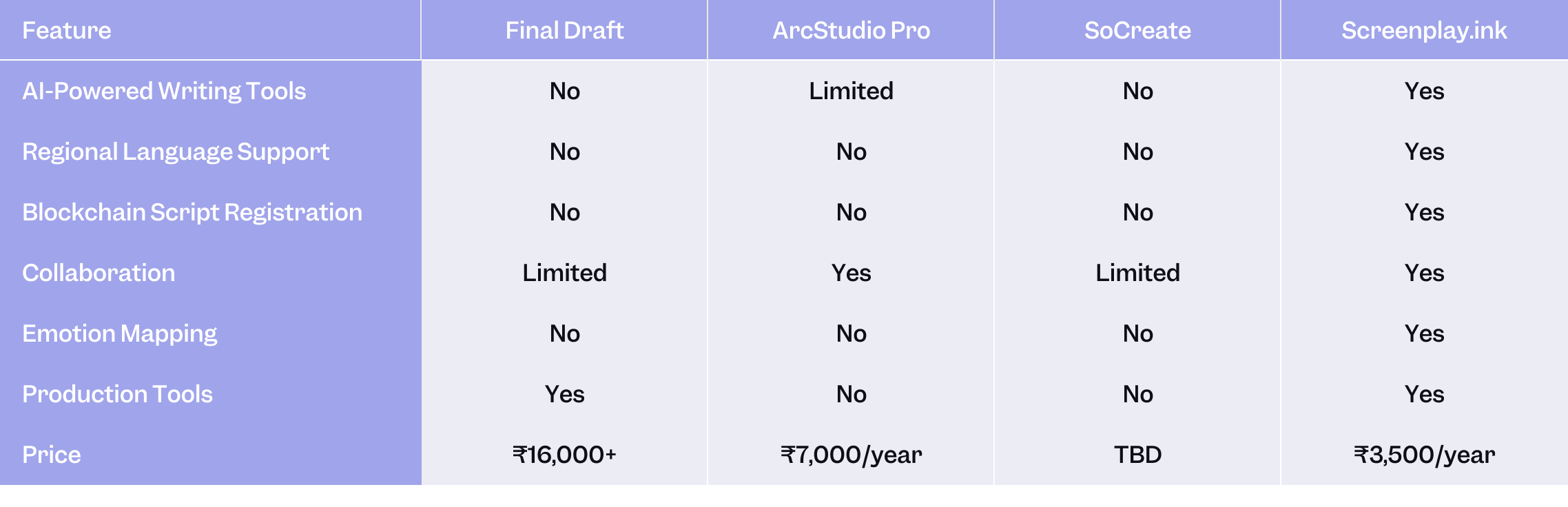
Final Note
Choosing the right software depends on your needs, budget, and workflow. While tools like Final Draft, ArcStudio Pro, and Celtx are solid choices,ScreenplayInk stands out by offering a complete end-to-end solution tailored for Indian and international writers.
Whether you’re writing in Hindi, crafting a regional-language script, or working on a global production, ScreenplayInkempowers you with tools that are affordable, secure, and industry-ready. Focus on your story—we handle the rest.